本網站使用瀏覽器紀錄 (Cookies) 來提供您最好的使用體驗。
您可以透過瀏覽器了解有關Cookie的更多訊息並更改設置。
若您選擇繼續瀏覽本網站,即表示您同意本網站使用Cookies。
歡迎查看我們的使用條款以了解更多相關訊息。
同意

台灣

中文 (台灣)
隨時隨地從行動裝置
發送列印指令!
SmaPri 使用戶能夠隨時隨地從任何行動裝置(例如智慧型手機或手持終端)將列印作業傳送至標籤印表機。
對於那些沒有專業知識的人來說,還可以使用應用程式來簡化PC上的標籤設計。
我們的標籤印表機 SmaPri 軟體開發工具提供三個模組 - 驅動程式、文庫和設計器。它們迎合具有不同開發需求的用戶,例如裝置作業系統、Web或本機業務應用程式。

1. SmaPri驅動程式
此中介軟體運行在Android OS/iOS/Windows上,提供標籤印表機通訊和列印功能。高端應用程式和SmaPri驅動程式之間的連結使用WebAPI,不僅可以從本機程式列印,還可以從Web應用程式列印。
2. SmaPri文庫 (SDK)
這是一個開發庫(SDK),適合在需要嵌入本機程式但SmaPri驅動程式無法處理時使用。
相容於Android/iOS,提供與標籤印表機通訊和列印的功能。

SmaPri驅動程式還具有檢查標籤印表機狀態的同時根據需要發送列印資料的功能,從而可以快速輕鬆地開發列印軟體應用程式。

3. SmaPri Designer
這是一個在Windows上運行的標籤設計工具。使用SmaPri Designer,您可以在螢幕上直覺又快速輕鬆地創建包含文字字串、條碼、圖像等標籤設計,無需標籤印表機命令知識。建立的標籤設計檔案也可以透過 SmaPri 驅動程式或 SmaPri 文庫順利傳送到印表機。
SmaPri Designer 中的標籤設計畫面
SmaPri Designer 支援各種對象,從文字、條碼和圖形到日期、序號和價格。使用此應用程序,您只需選擇物件並將其放置在標籤範本上,即可輕鬆設計可使用 SmaPri 驅動程式和 SmaPri 文庫列印的標籤設計。


array (
)
array (
0 =>
WP_Term::__set_state(array(
'term_id' => 9621,
'name' => '整合配件',
'slug' => '%e6%95%b4%e5%90%88%e9%85%8d%e4%bb%b6',
'term_group' => 0,
'term_taxonomy_id' => 9621,
'taxonomy' => 'product_category',
'description' => '',
'parent' => 0,
'count' => 3,
'filter' => 'raw',
)),
1 =>
WP_Term::__set_state(array(
'term_id' => 1192,
'name' => '軟體與公用程式',
'slug' => '%e8%bb%9f%e9%ab%94%e8%88%87%e5%85%ac%e7%94%a8%e7%a8%8b%e5%bc%8f',
'term_group' => 0,
'term_taxonomy_id' => 1192,
'taxonomy' => 'product_category',
'description' => 'SATO 提供全方位的軟體解決方案,可滿足支援與部署 SATO 硬體、開發應用程式軟體,以及與 ERP 、WMS 與其他 IT 系統相互整合等顧客需求。
',
'parent' => 0,
'count' => 17,
'filter' => 'raw',
)),
)
array (
141 =>
WP_Term::__set_state(array(
'term_id' => 141,
'name' => 'Products & Solutions',
'slug' => 'products-solutions',
'term_group' => 0,
'term_taxonomy_id' => 141,
'taxonomy' => 'resource_category',
'description' => '',
'parent' => 0,
'count' => 200,
'filter' => 'raw',
)),
)
array (
141 =>
WP_Term::__set_state(array(
'term_id' => 141,
'name' => 'Products & Solutions',
'slug' => 'products-solutions',
'term_group' => 0,
'term_taxonomy_id' => 141,
'taxonomy' => 'resource_category',
'description' => '',
'parent' => 0,
'count' => 200,
'filter' => 'raw',
)),
2742 =>
WP_Term::__set_state(array(
'term_id' => 2742,
'name' => '製品 & 解決方案',
'slug' => 'products-solutions-zh',
'term_group' => 0,
'term_taxonomy_id' => 2742,
'taxonomy' => 'resource_category',
'description' => '',
'parent' => 0,
'count' => 163,
'filter' => 'raw',
)),
)
array (
147 =>
array (
'category' =>
WP_Term::__set_state(array(
'term_id' => 147,
'name' => 'Quick Guides',
'slug' => 'quick-guides',
'term_group' => 0,
'term_taxonomy_id' => 147,
'taxonomy' => 'resource_category',
'description' => '',
'parent' => 141,
'count' => 27,
'filter' => 'raw',
)),
'resources' =>
array (
0 =>
(object) array(
'ID' => '4872',
'post_author' => '1',
'post_date' => '2019-07-22 01:32:25',
'post_date_gmt' => '2019-07-22 01:32:25',
'post_content' => '',
'post_title' => 'Installation Guide (Android)',
'post_excerpt' => '',
'post_status' => 'publish',
'comment_status' => 'closed',
'ping_status' => 'closed',
'post_password' => '',
'post_name' => 'installation-guide-android',
'to_ping' => '',
'pinged' => '',
'post_modified' => '2021-01-07 10:28:47',
'post_modified_gmt' => '2021-01-07 10:28:47',
'post_content_filtered' => '',
'post_parent' => '0',
'guid' => 'https://satoasiapacific.com/taiwan/resource/installation-guide-android/',
'menu_order' => '0',
'post_type' => 'resource',
'post_mime_type' => '',
'comment_count' => '0',
),
),
),
2778 =>
array (
'category' =>
WP_Term::__set_state(array(
'term_id' => 2778,
'name' => '快速指南',
'slug' => 'quick-guides-zh',
'term_group' => 0,
'term_taxonomy_id' => 2778,
'taxonomy' => 'resource_category',
'description' => '',
'parent' => 2742,
'count' => 28,
'filter' => 'raw',
)),
'resources' =>
array (
0 =>
(object) array(
'ID' => '6021',
'post_author' => '1',
'post_date' => '2020-08-21 01:12:10',
'post_date_gmt' => '2020-08-21 01:12:10',
'post_content' => '',
'post_title' => 'Installation Guide (Android)',
'post_excerpt' => '',
'post_status' => 'publish',
'comment_status' => 'closed',
'ping_status' => 'closed',
'post_password' => '',
'post_name' => 'installation-guide-android-6',
'to_ping' => '',
'pinged' => '',
'post_modified' => '2020-08-21 01:12:11',
'post_modified_gmt' => '2020-08-21 01:12:11',
'post_content_filtered' => '',
'post_parent' => '0',
'guid' => 'https://satoasiapacific.com/taiwan/resource/installation-guide-android-6/',
'menu_order' => '0',
'post_type' => 'resource',
'post_mime_type' => '',
'comment_count' => '0',
),
),
),
)
相關商品

33W 防拆標籤剝離器
特徵
33W 防拆標籤剝離器可剝離任何形狀的標籤,其具備快速釋放按鈕和輕鬆安裝的嵌入式可替換卡匣,紙捲安裝更迅速。
應用
可剝離零件與產品標籤底紙,適用於製造組裝線,以及供零售業與食品業隨身列印價格、產品標籤與促銷標籤之用。
詳情
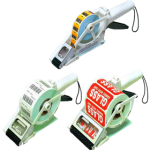
APN 系列
特徵
可單手操作,為操作人員提供絕佳的便利性;支援多種標籤類型與大小。
應用
可剝離零件與產品標籤底紙,適用於製造組裝線,以及供零售業與食品業隨身列印價格、產品標籤與促銷標籤之用。
詳情
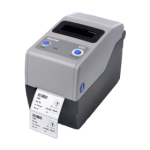
CG2
特徵
使用鍵盤以獨立作業、使用靈活、高品質列印、便於操作,易於使用、極簡式保養、使用安全、具備強大兼容性。
應用
腕帶、樣本標籤、產品標籤。
詳情

CG4
特徵
使用鍵盤以獨立作業、使用靈活,與舊版系統相容、高品質列印、便於操作,易於使用、極簡式保養。
應用
零件與產品標籤、腕帶、樣本標籤、物流標籤。
詳情

M84Pro
特徵
堅固型工業級結構,內部構造堅固耐用,多種解析度可供選擇,可高速列印,針對材質較厚的標籤有旋轉式切刀可供選購。
應用
PCB 與元件標籤、物流標籤、零件與產品標籤。
詳情


 有關 SmaPri 文庫更多訊息,請聯繫您當地SATO營業處。