 English
 SmaPri
request for information back to Software & Utilities- Home
- Products
- Software & Utilities
- SmaPri
 Asia Pacific

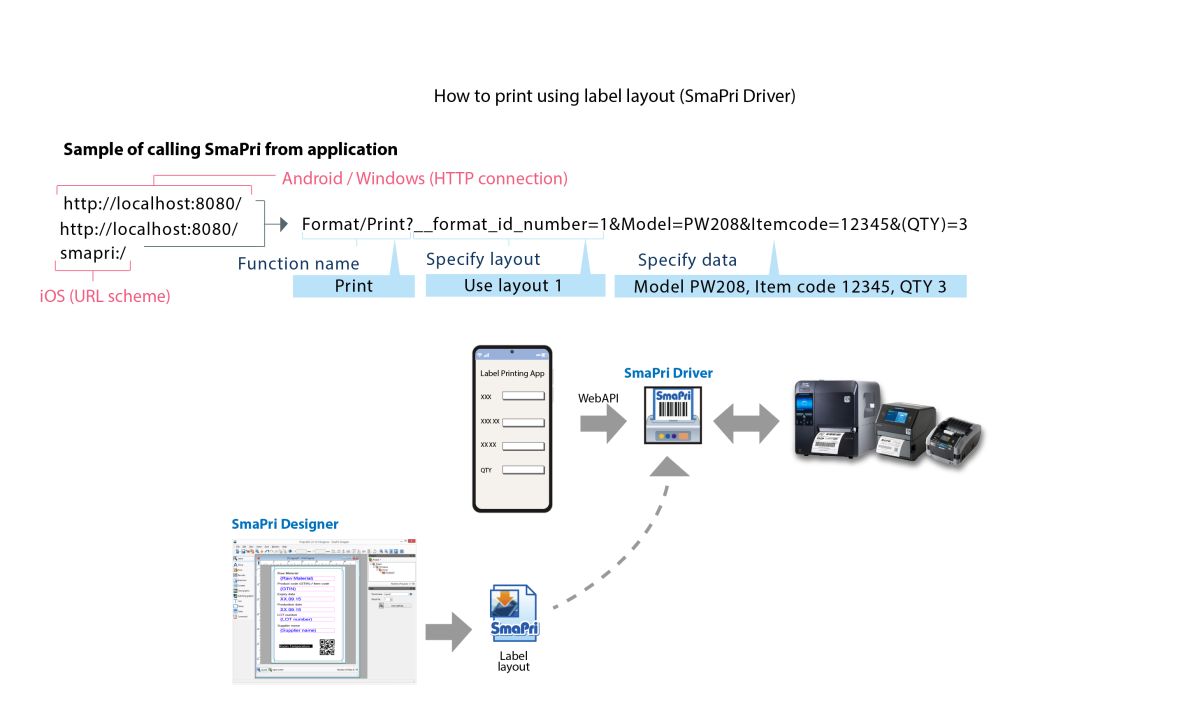
SmaPri enables users to send print jobs to a label printer from any mobile device, such as a smartphone or handheld terminal, at any time and place.
An application is also available to simplify label design on a PC for those without specialised knowledge.


 SmaPri Driver also has a function to send print data as needed while checking printer status, allowing for quick and easy development of printing software applications.


| SmaPri Driver | Supported OS | Android OS 16 / 15 / 14 / 13 / 12 / 11 / 10 / 9 |
| iOS 26 / 18 / 17 | ||
| Windows 11 | ||
| SmaPri Library | Supported OS | Android OS 16 / 15 / 14 / 13 / 12 / 11 / 10 / 9 |
| iOS 26 / 18 / 17 |
 For more information about SmaPri Library, please contact your local SATO office or distributor.





























